
.png)
Performance
Redis Cache-Aside Caching in NestJS for SMW Music Academy
How Redis cache-aside caching cut a NestJS API from 180-350ms to 5-10ms for SMW Music Academy, with targeted key invalidation to keep data fresh.
Project Overview
SMW Music Academy's NestJS backend was hitting the database on every request, with API response times of 180-350ms for listings and up to 3 seconds for dashboard statistics. We implemented Redis caching using the cache-aside pattern, checking memory first, querying the database only on cache miss, and invalidating targeted keys on data updates. The result: API responses dropped to 5-10ms, database CPU usage fell by 40-70%, and the system now handles 3-5x more concurrent users at 30-60% lower infrastructure cost.
Without Cache: The Problem
Every API request hit the database directly, even for data that rarely changes, like product listings, category trees, and dashboard statistics. The result was unnecessary CPU load, slow response times, and a system that could not handle traffic spikes without additional infrastructure spend.
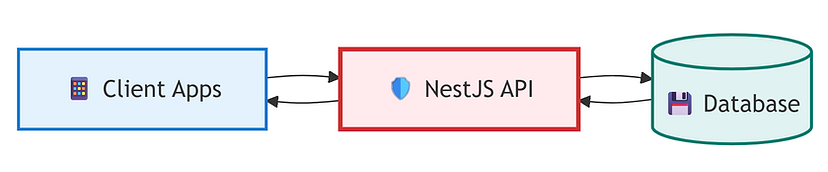
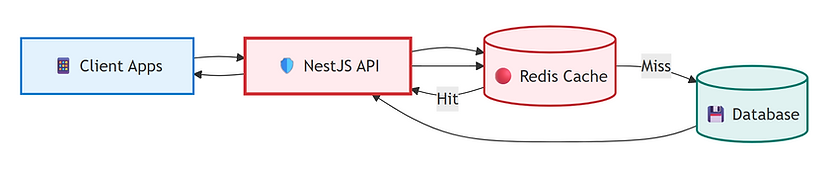
With Redis Cache: The Solution
With the cache-aside pattern in place, the API checks Redis first on every request. If the data is cached, it returns in under 5ms without touching the database. On a cache miss, the database is queried, the result is stored in Redis with a defined TTL, and all subsequent requests are served from memory until the key expires or is invalidated by a data update.
Business Value Flow
Redis caching creates a compounding improvement across the entire stack. Faster responses improve user experience, reduced database load lowers infrastructure costs, and higher throughput capacity enables growth without proportional hardware investment, delivering measurable ROI from a targeted architectural change.

Client Objectives
The engagement was guided by clear objectives that defined success for business leadership and delivery teams.
Reduce API Response Times
Drop response times from 180-350ms to under 10ms for frequently accessed endpoints using in-memory caching.
Increase Throughput Capacity
Enable the system to handle 3-5x more concurrent users without additional server infrastructure.
Lower Infrastructure Costs
Reduce database CPU usage by 40-70% and server scaling costs by 30-60% through intelligent caching.
The challenge
Complex constraints hindering growth
Slow API Response Times
Product listing and search APIs took 180-400ms per request, with dashboard statistics requiring 2.5-3 seconds, causing noticeable lag for users.
Heavy Database Load
Every request hit the database directly, even for frequently accessed and rarely changing data, causing unnecessary CPU usage and read operations.
Rising Infrastructure Costs
As traffic grew, the system required more server resources to handle repeated database queries, driving up hosting and scaling costs.
Limited Concurrent Capacity
The backend could not handle traffic spikes efficiently, leading to degraded user experience during peak usage periods.
The solution
Redis Cache-Aside Pattern
Implementing the cache-aside pattern with Redis to serve frequently requested data from memory, reducing database load and delivering near-instant API responses.
Cache Strategy Design
Analyzed API traffic patterns to identify high-frequency, low-change endpoints suitable for caching. Designed TTL policies and cache key structures for each data type.
- Traffic Analysis
- TTL Strategy
- Cache Keys
Redis Integration
Integrated Redis into the NestJS backend using the cache-aside pattern: check cache first, serve from memory if available, query database and populate cache on miss.
- Cache-Aside
- NestJS
- Redis
Cache Invalidation
Implemented targeted cache invalidation on data updates to prevent stale data. When records are modified, only the affected cache keys are cleared.
- Invalidation
- Data Freshness
- Key Management
Monitoring & Tuning
Set up cache hit/miss ratio monitoring and tuned TTL values based on real usage patterns to maximize cache effectiveness without serving stale data.
- Monitoring
- Hit Ratio
- Performance Tuning
Technologies Implemented
- NestJS
- Redis
- MySQL
- Next.js
- 20x
- Faster API Responses
- 40-70%
- Reduction in DB CPU Usage
- 3-5x
- More Concurrent Users Supported
- 30-60%
- Lower Server Scaling Costs
Business impact
High-ROI Performance Gains
Redis caching delivered measurable improvements across speed, cost, and capacity, without rewriting core business logic.
Cost Reduction
- 30-60%
- Lower server scaling costs
- 50-90%
- Fewer database read operations
Performance
- 5-10ms
- API response time (from 180-350ms)
- 40-70%
- Reduction in database CPU usage
User Experience
- 3-5x
- Higher API throughput capacity
- 25-50%
- Faster page load speeds
How we drive results
Turning Strategy into Measurable Business Impact
Our case studies reflect a consistent delivery model focused on outcomes, helping organizations modernize technology, reduce risk, and accelerate growth through practical, scalable solutions.
Outcome-Driven Strategy
Every engagement starts with clear business objectives, success metrics, and a roadmap aligned to real operational and financial outcomes.
Proven Execution Model
We apply proven frameworks, agile delivery, and industry best practices to execute complex initiatives with speed, quality, and predictability.
Secure & Scalable Delivery
Our solutions are built with security, compliance, and scalability at the core, ensuring long-term resilience and sustainable growth.
Ready to Optimize Your Backend Performance?
From slow API responses to near-instant delivery, let Redis caching transform your backend performance and reduce infrastructure costs.
Start Your Optimization